
Did you know that the e-learning industry is booming, valued at $365 billion in 2025 and expected to cross $800 billion by 2030?
And if you’re planning to start an online education business, Thinkific is one of the most talked about course creation platforms.
Read this in-depth Thinkific review to analyze its features, pricing, pros & cons, and course tools to turn your knowledge into a profitable online course.
Is Thinkific The Best Course Selling Platform?
Thinkific is an online course platform with which you can create, host, market and sell courses. It is a platform that can be used by any individual or business to sell online courses in any format.
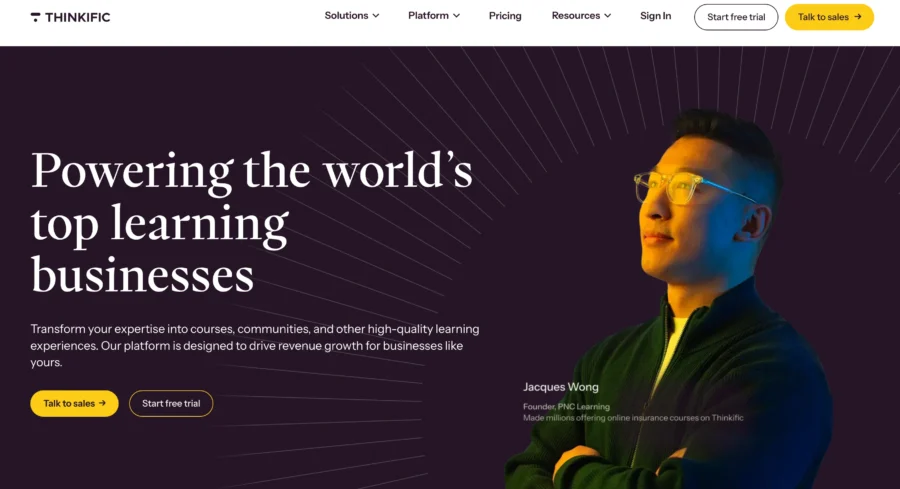
One of the top platforms for online education is Thinkific. You may design, market and maintain your courses online.
With Thinkific, you can make both sales pages and course pages. This platform also assists you in managing your subscribers and promoting your online course through the use of vouchers and an affiliate network.
It is a trusted platform with over 35,000 happy customers. Here is what you need to know:
- You can create lessons in multiple formats like video, audio, digital downloads, surveys, exams and many more.
- There is no transaction fee for any courses you sell.
- If you are a first-time user, you also get dedicated customer support to sign up for the platform.
- The pricing is affordable, and the platform offers a free 30 days trial as well.
But what distinguishes it is its integration of all the tools required by educators to sell online courses.
It has a website builder that is drag-and-drop. You don’t need to know how to code HTML to build the perfect website for your online coaching business.
Overall, the platform has been around for years and with regular updates, it is one of the most popular course building platforms that you can use to create and launch courses quickly with powerful monetization features.
What Are The Pros & Cons Of Thinkific?
Here are the pris and cons of Thinkific.
| Thinkific Pros | Thinkific Cons |
|---|---|
| Beginner-friendly drag-and-drop builder for courses, pages, and websites. | Not a full all-in-one platform like Kajabi. |
| Supports multiple courses and material types. | Website builder does not have advanced design customization. |
| No transaction fees on any plans. | The mobile app is limited to students only. |
| Supports student engagement tools like quizzes and certificates. | Community features and gamification are basic. |
| Full control over course pricing, scheduling and payment plans. | |
| Comes with a custom-branded mobile app. | |
| Strong integrations. | |
| Has built-in email marketing. | |
| Strong analytics and reporting. |
What Do You Need To Build A Course On Thinkific?
Thinkific is of the industry leaders of online course builder platform studded with tons of features.
- Course Builder Module
- Thinkific Site Builder
- Analytics
- Third-Party Integrations
- Course Payment Options
1. Online Course Builder Module
The Thinkific course builder is a simple drag-and-drop editor. You can drag all the elements of your course on the page with a simple click and publish them within minutes.
It receives top scores for its drip content capabilities, be its course appearance, ability to create several membership tiers, and content adaptability.
It outshines the other platforms in its user-friendly sites to house your courses.
First off, the platform offers a number of pre-configured templates that can be quite helpful to course creators who need assistance with content organization.
The templates cover a wide range of typical situations that you may consider if you were selling educational products.
Here are some of the top features of the Thinkific course builder module:
A. Bulk Importer
There will inevitably be a learning curve if you have no experience working with web content, but Thinkific has done a good job of making that curve as manageable as possible.

Thinkific’s ‘Bulk Importer’ allows content creators to migrate from other platforms or with existing material to add multiple content pieces at once.
B. Create Membership Levels
Access to your online courses as an educator must be accompanied by a proper revenue strategy so Thinkific enables educators to create membership levels.
C. Drip Schedule Campaign
Your classes can be scheduled for a specified time using the Drip Content. This is beneficial for classes that genuinely require practice and time.
For instance, exercise, meditation, etc. Drip content helps prevent information overload, keeps students interested, and improves their learning outcomes.
D. Completion Certificates
Thinkific lets educators create course completion certificates with ease. You can choose from ready-made templates or design your own by adding your logo and custom branding to match your business.
It allows you to add your company or school logo, change fonts and colors to match your branding, and assign a single certificate to multiple courses.
2. Thinkific Site Builder
Your site’s landing page is the most important page. This page displays all of your types of courses, therefore it needs to be visually appealing enough to entice visitors to sign up for your online courses.
You may create pages for various sections of your website that appear professional with the aid of Thinkific’s Site Builder. You have the option to import external themes or you can select from one of their built-in themes.
Most pages can also have additional parts added.
You may set up a visually appealing home page for your course site and construct as many unique pages as you need using Site Builder, which is just a feature of the platform’s admin panel.
Although you can’t install your own style sheets (CSS), for example, you do get excellent control over branding components like colors and font styles, and you can upload any kind of picture or media you’d like to utilize.
Here are some of the most intriguing features of a site builder:
- SSL: All of Thinkfic’s plans come with a basic SSL certificate. You have to switch to the “Premier” plan if you want to use your own SSL.
- White labeling: You can easily remove the “Powered by Thinkific” language from your site and courses by upgrading to a Grow Plan ($149 per month).
3. Reports And Analytics
Through the provision of a centralized reporting and analytics solution, Thinkific has made a commendable effort to streamline the entire process.
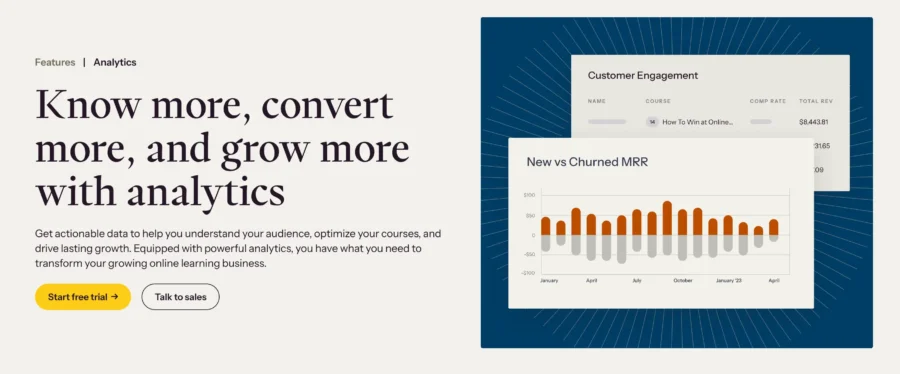
To produce precise data on the main admin panel, it may track a variety of student and course factors.
Organization, last sign-in date, online course activation date, course starting date, course completion date, email, name, percentage of finished course, percentage of course viewed, etc.
4. Third-Party Integrations
Integration is essential because the creators of thinkific platforms recognize that integration will help it to become more powerful tool as an online course platform.
Thinkific as so far, has concentrated its integration efforts on six key areas: e-commerce, automation tools, analytics, e-mail marketing, student success, and growth tools.
- Stripe
- PayPal
- Shopify
- Stunning
- Zapier
- Infusionsoft
- Google Analytics
- Segment.io
- Mailchimp
- ConstantContact
- ConvertKit
- Zoom
- Accredible
- Disqus
- Sumo
5. Course Payment Options
Given that most tutors enter the online learning industry for financial gain, Thinkific’s choices for paying for online courses particularly caught my attention.
Here various models are available which are not just using the typical subscription process, in fact, you can decide to provide your courses for free distribution.
And now when I think about it, I realise this would be a smart move when trying to generate interest in a major launch.
Then, when it comes to the real thing, you may either use a one-time payment method or a subscription-based one.
While the latter option requires ongoing payments over time, the former effectively charges a single amount to access the online course content.
How Much Thinkific Plans Cost?
If you are looking to sign up, here are the Thinkific pricing plans will active in 2026.
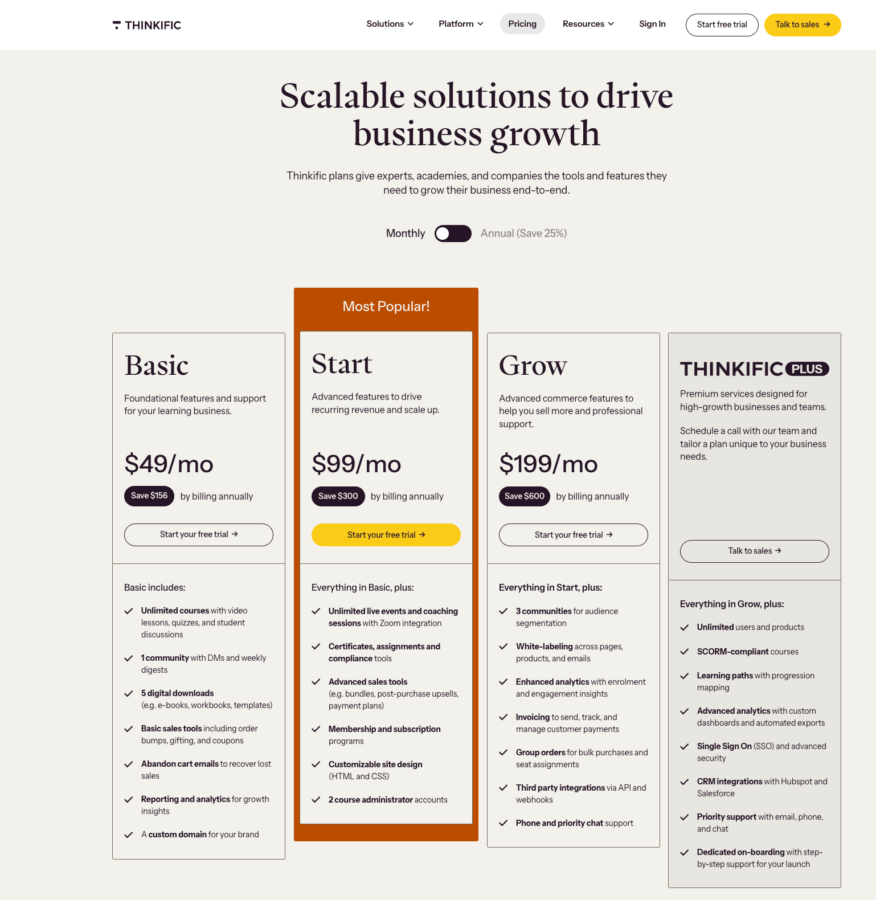
| Thinkific Plans | Thinkific Monthly Pricing | Thinkific Yearly Pricing (25% OFF) |
|---|---|---|
| Basic Plan | $49/Month | $36/Month |
| Start Plan | $99/Month | $74/Month |
| Grow Plan | $199/Month | $149/Month |
| Thinkific Plus Plan | Custom | Custom |
A. Basic Plan ($36/Month)
It provides some basic features to get you started on your first course. However, it comes with a lot of limitations on the dashboard tools. The Basic Plan costs $49/month and $36/month (if you paid annually).
- Custom Domain
- Unlimited Courses And Unlimited Students
- 1 Site Admin Account
- 5 Digital Downloads
- Basic Sales Tools Like Coupons etc.
- Abandon Cart Emails
- Reports And Analytics
2. Start Plan ($74/Month)
There are enough features here to start creating your course, even if you won’t have access to all of Thinkific’s features. The Start Plan costs $99/month and $74/month (if you paid annually).
You’ll be able to use a branded name and provide some nice features like coupons. Additionally, you’ll have access to connectors with a few other tools, such as an email marketing program.
- One-to-One Student Interactions vis Zoom
- Custom Domain
- Live Chat Support
- Advanced Sales Tools
- Membership And Subscriptions
- Custom Site Designs
- 2 Course Administrator Accounts
3. Grow Plan ($149/Month)
You can customize your site with the Thinkific Grow plan, giving you the ability to provide the best customer experience for your learners.
There are enough features here to start creating your course, even if you won’t have access to all of Thinkific’s features. It costs $199/month and $149/month (if you paid annually).
Assignments and communities can also be created. Finally, you’ll get priority support from Thinkific, which means you’ll get help faster when you need it.
- 3 Communities for audience settlement
- White Labelling
- Analytics and Reports
- Smart Invoicing To Send, Monitor & Manage Payments
- Group Orders for Bulk Purchases and Easy Seat Assignments
- Third Party Integrations
- Priority Chat Support
4. Thinkific Plus Plan ($374/Month)
If you want more powerful features, you can choose the Thinkific Plus Package instead of the Grow Plan, which
There are enough features here to start creating your course, even if you won’t have access to all of Thinkific’s features. It costs $499/month and $374/month if you paid annually.
With this add-on, you can sell your courses to groups like organizations and give analysts the job of making reports. You can also get rid of all Thinkific branding from your site and course, which is another great feature.
Flagship courses are frequently included in packages with extras like other courses, extra services like coaching, or tangible goods. They may control a wide range of pricing ranges and extensive brands.
- Unlimited Products
- Unlimited Users
- SCROM Compliant Courses
- Structured Learning Paths with Clear Progress Tracking
- Advanced Analytics including Different Dashbords
- Security And SSO
- CRM Integrations
- Priority Customer Support
- Dedicated Training Will Be Conducted For Smooth On-Boarding
Here is a simple comparative table for you to get a side-by-side view of the features included in each plan.
Features Of Thinkific Plans
| Features / Capability | Basic Plan | Start Plan | Grow Plan | Plus (Enterprise) Plan |
|---|---|---|---|---|
| Courses & Students | Unlimited | Unlimited | Unlimited | Unlimited |
| Communities | 1 | 1 | Upto 3 | Unlimited |
| Digital Downloads (ebooks, templates, PDFs, etc.) | 5 downloads | Unlimited | Unlimited | Unlimited |
| Live Lessons / Webinars / Coaching | Limited | Unlimited via Zoom integration | Unlimited via Zoom integration | Unlimited via Zoom integration |
| Memberships / Subscriptions / Payment Plans | Not included | Included | Included | Included |
| Upsells and Bump Order | Not included | Included | Included | Included |
| White-Labelling | Not included | Included | Included | Included |
| Analytics and Reporting | Basic | Advanced | Advanced | Advanced |
| Advanced CSS/HTML | Not included | Included | Included | Included |
| Custom Domain | Included | Included | Included | Included |
| Support Level | Email + chat support | Email + chat support | Priority support | Dedicated account manager |
Who can sign up for the Thinkific Free Trial?
If you are wondering, is Thinkific free? Here is some good news for you.
The platform did offer a free plan previously, but currently, the offer has been removed. But you can sign up for a free 30 days trial to try out its features.
This is the best opportunity to sign up for a paid plan and get access to all the advanced features without committing. You can always cancel your plan before the trial period is over, so you don’t get charged. But you need to add your credit card details to get started.
Keep in mind that you do not get custom domains, SSL and white-labelling features on the free trial. For that, you need to confirm your subscription and get started.
In fact, here is an ongoing offer for all Bloggervoice readers. You can sign up for any plan with a 25% discount for a limited time. You can click here to sign up for any annual Thinkific plan and save more than the monthly plans.
Who is Thinkific Best For?
We recommend the tool to:
- Online educators who want quick publishing
- Coaches and consultants who need scheduled live classes
- Fitness instructors who need drip content
- Universities and schools that need student progress tracking
- Corporate training teams that need unlimited student access
- Nonprofits and community organizers
If you have really been considering signing up for an online course platform, this might just be your best shot and getting a good balance between flexible course publishing features and marketing tools.
It might not have advanced marketing features like other platforms, like Kajabi, but it is not priced as much as they all are.
If affordable options are what you are looking for, then the Thinkific alternative, Leadpages, is a good option, but again, it has limited flexibility when it comes to course types and payments.
This platform sits somewhere in between and gives you both fast and fast course publishing and strong sales tools, and is the safest bet if you are starting new.
In general, if you want to monetize content online, you have everything you need here. You can sign up for their free trial and see if it suits you or not.
Thinkific Marketing and Selling Of Courses
The Thinkific platform was designed from the ground up to facilitate the marketing and sale of online courses.
Most of these features can be found in the administration panel’s “Market and Sell” area, although some of the most useful tools for marketing and selling can be found in other sections of the panel as well.
Here I explained the most efficient marketing tactics for the sale of online courses, which will help you improve both your revenues and the number of students enrolled.
1. Identify Your Special Selling Point
Examine what’s already out there in the way of online courses on your subject, to get a sense of what’s already covered and how the material is delivered.
The point is to think about what sets your course apart from the others. Where will you fill in the gaps that your rivals have left in their treatment of this subject? What do you bring to the table that other courses don’t?
Make sure your marketing materials and course sales page highlight your course’s unique selling proposition (USP).
2. Develop A Unique Course Title Using Keyword Research
Imagine that you are searching for information regarding your topic. What search terms would you use to locate the desired information?
Using a tool like Google’s Keyword Planner or BuzzSumo, determine the most popular keywords related to your course’s content, and include them in the course title.
This can help you present your course as exactly what a prospective student is looking for while searching online for your topic.
3. Before You Design Your Course, Research Your Audience
This is a crucial stage in the process since it guarantees that your online course will be something that people will want to enroll in.
If you have a following, a survey asking what they want to learn about is a good idea. Make a program that caters to their needs, not yours.
Having your target audience participate in the development of your course is not only a terrific way to get them excited about it before it’s even released.
It also helps you confirm that there’s a need for your course’s content before you devote time and money to making it.
4. Presell Online Course
The risk of making a course that nobody wants to buy can be mitigated by selling it in advance. It may seem contradictory to try to sell something before you produce it, but trust us on this.
Before investing a substantial amount of time and money into building an online course that no one buys, it is very advisable to first propose the idea to your target audience and find out whether they are interested in it.
How To Create A Course On Thinkific?
There is no better website than Thinkific to develop your own online courses and earn money from them, especially if you’re a relative newbie.
Thinkific provides you with a comprehensive toolkit to assist you in building a professional website where users can sign up for your online courses.
Its accessibility supports its adaptability because it takes less time to sign up and publish your first course than ever before.
1. Create A Thinkific account
Creating and setting up the account on Thinkific is a breeze. Create a Thinkific account at thinkific.com. You can either create a new account or sign up for a free trial of a paid plan here.
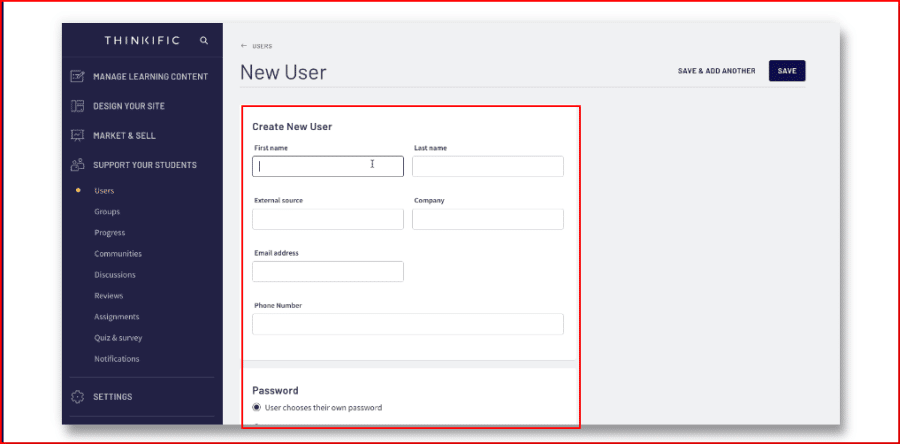
Once your account is ready, change the name of your school by selecting the Settings item from the side menu. You can also set a unique URL for your school website.
The next step is to figure out how to create pages after selecting a theme. Select “Site Builder,” then “Pages,” “Custom Page,” and “Add,” and then enter a title for the page.
By selecting Section Type for a page, advanced sections can be added. You may use these templates to create CTAs, social proof sections, logos, and testimonials for your landing page.
2. Create Your Course
To start creating your course, choose one of Thinkific’s course templates. If you’d rather build everything your own way, just select “Blank” and start from scratch.
Thinkific gives you several ready-made templates, which helps a lot if you are not fully sure how to structure your course yet. These templates cover many common course types, so you can set up your content faster without staring at a blank screen and questioning every life choice.
If you are new to working with online course content, you should expect a small learning curve. The good news is that Thinkific keeps the setup process simple, so it feels much less overwhelming than many other platforms. Once you spend a little time with it, the workflow starts to make sense.
Inside each chapter, you can add lessons based on the format you want to teach with. These lessons can include videos, multimedia files, PDFs, and other learning materials you may have created in another program.
If you already have your files ready, you can upload them quickly using Thinkific’s Bulk Importer. You can drag and drop your content straight into the platform, which saves time when you are building a larger course library.
After uploading your lessons, you can rename each course and write a clear description for it. This helps your students understand what each lesson covers before they begin.
You can also add extra learning materials in the Downloads section within each lesson’s text description box. That makes it easy to share worksheets, guides, bonus files, or even recommended tools and resources. If your course includes personal growth, learning hacks, or mindset training, you could even point learners to useful deals or tools such as a 50% off Mindvalley coupon as an added bonus resource.
When you want to make your course more interactive, go back to your course builder and click “Add Lesson.” Thinkific gives you several lesson types to choose from, including quizzes.
To create a quiz, simply select the “Quiz” lesson option and add your own questions and answers. This is a simple way to test what students have learned and keep them more involved throughout the course.
3. Customize Your Page
If you want to sell your Thinkific course, you’ll need a landing page that makes people want to sign up.
The more likely you are to sell your course, the better your landing page looks. In the top right corner, there is a tab called “Build A Landing Page.”
A good landing page is made up of about 7 main parts. These parts are as follows:
- A banner.
- What the course is about?
- The section of the curriculum shows the instructor’s bio.
- Questions that are often asked.
- Testimonials and other proof from the public.
- CTA button.
Just click on the sign. Next, click on Site Builder, then click on Courses, and choose the course for which you want to make a landing page.
Click “Banner” and then click “Hero Image.” Here, you can add any picture you want. When you’re done, click “Save.”
You can also add a CTA button by clicking “Add Button,” then “Button,” and changing the text to whatever call to action you want. You can also choose where you want the user to go when they click the button.
You only need to click “Add Section” and choose “Text” under “Section Type.”
From here, the process is pretty much the same for your Instructor Section, FAQs, testimonials, and calls to action.
All you have to do is click “Add Section” and choose what kind of section you want from the “Section Type” dropdown. Get a template for things like bios and frequently asked questions.
4. Publishing Your Course
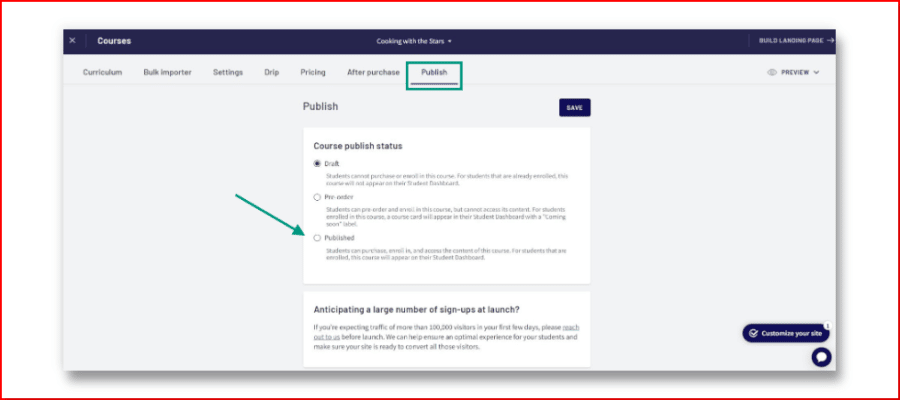
Return to Manage Learning Content and select Courses once more. Choose the course you want to publish, double-check the information, and then click the Publish button. Save your work after selecting “Published.”
Thinkific provides a guide on how to properly promote your course. You can also simply copy and paste the course link into your social media.
If you have a paid plan, you can create an email list with information for each user who registers for your class.
And there you have it! Your course has been created and published for all to see.
Once published, you can preview the course to see how it works from your student’s point of view. In the first lesson, I have a presentation, followed by a quiz, and then a PDF:
Which Thinkific Plan Is The Best For You?
If you are just getting started creating online courses and want to explore how the Thinkific platform works for you, the Thinkific Free trial of any paid plan is a wonderful option to consider.
That means you only need to create a single course to satisfy the needs of an infinite number of consumers.
At the moment, I am enrolled in the Grow plan, which costs $149/per month. It satisfies all of the fundamental requirements, including a sufficient amount of functionality, speed, user-friendliness, and support.
It offers the most satisfying buying experience possible to your students.
What Are The Lesson Types Do Thinkific Offer?
Youn will learn more about the various content and lesson types you can use inside your Thinkific course, and how to use them in a way that best suits your course’s goals and the learning styles of your audience.
1. Text Lessons
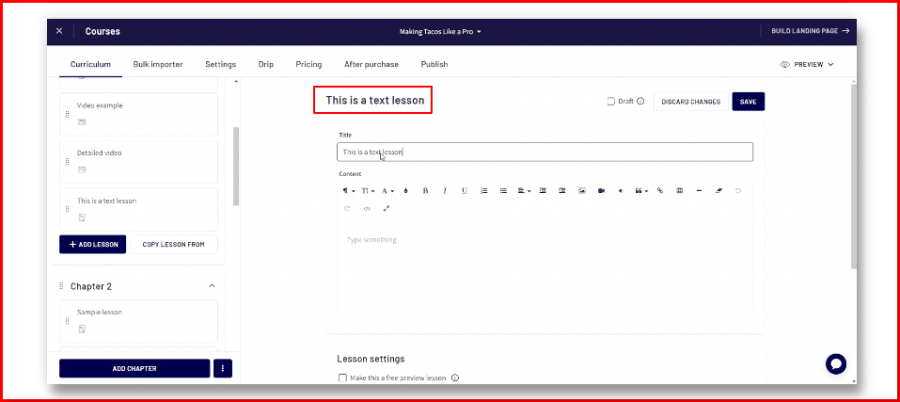
Text Lessons may contain not only bodies of text but also styled HTML material, in addition to other items such as graphics or links to external websites. You may also include audio and video files in your posts!
2. Video Lesson
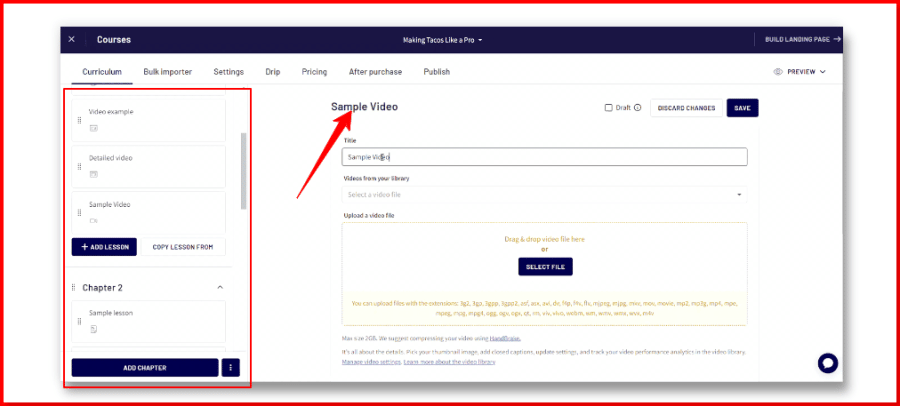
To enhance learning, video lessons provide a more engaging medium for instruction. Wistia is used as the host for all of the uploaded videos. A wide variety of video file formats are accepted by Thinkific.
3. Quiz Lessons
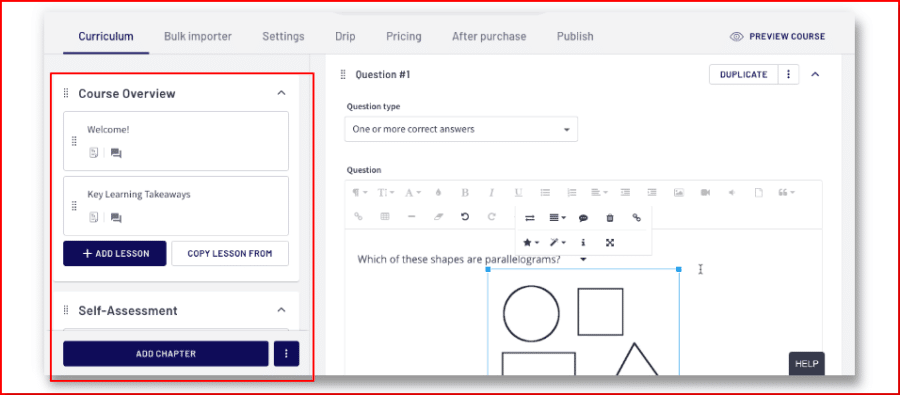
Creating a quiz using Thinkific is simple. You can create surveys with multiple-choice questions and answers.
But do you know what makes Thinkific truly unique? The right answers can even have their rationales included! The benefits to the children’s ability to learn are substantial.
4. PDF Lessons
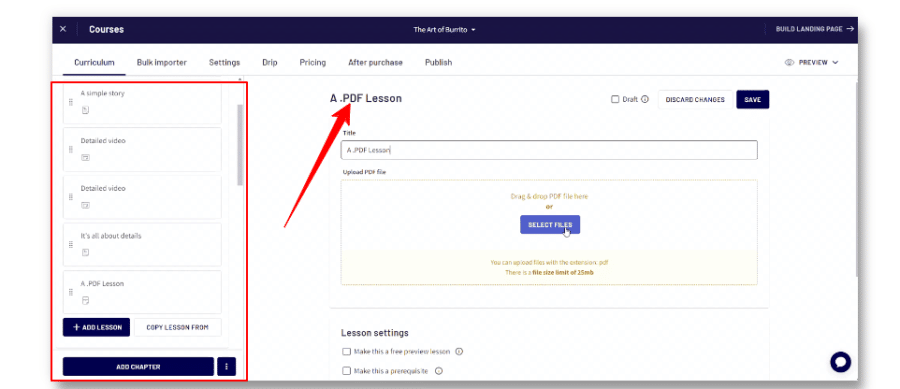
Uploading PDF lessons for student viewing is simple with the Thinkific Course Player’s support for the format.
5. Presentation Lesson
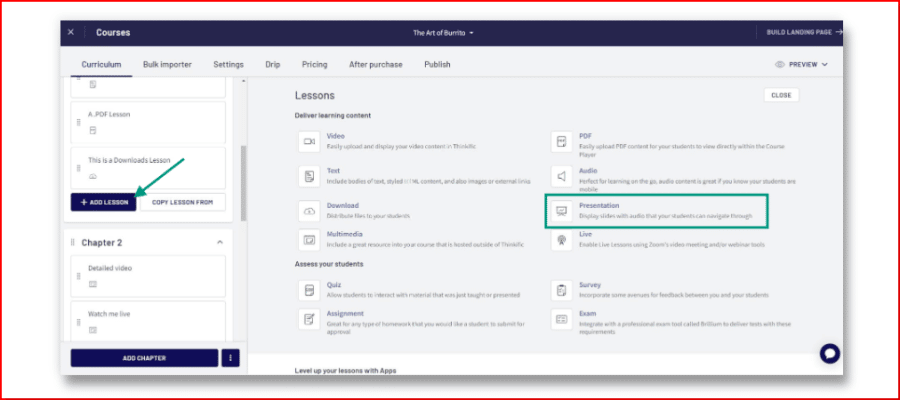
You can’t make a Presentation lesson without including a PDF. After uploading your PDF, it will be automatically converted to images that will be used as slides in your Presentation course.
What Are The Different Templates Offered By Thinkific?
When developing a new course, Thinkific offers many templates to help you organize your thoughts and translate your expert knowledge into commercial courses.
1. Blank Course
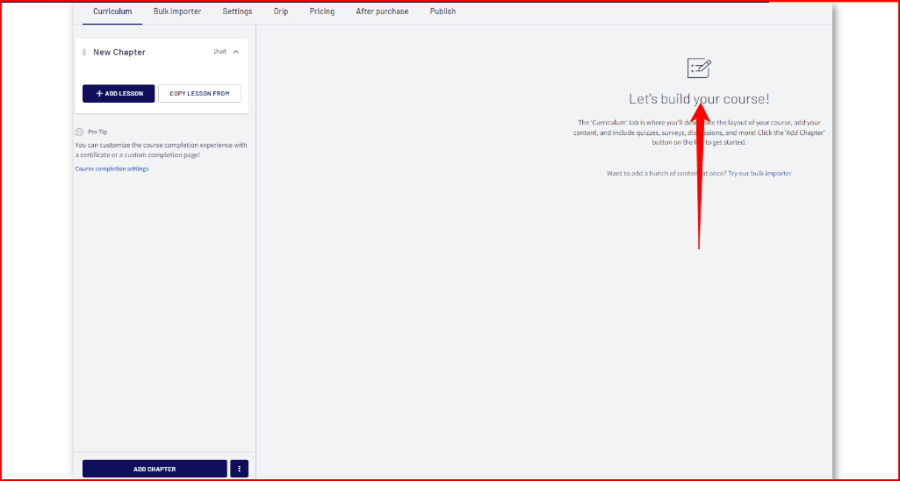
This template does exactly what you’d expect: it enables you to upload your own content and construct a course from scratch to meet your own pedagogical requirements.
This template has no fixed structure or outline; instead, you can change anything to fit your needs.
Using this as a starting point, you may develop your courses by adding chapters and lessons, or you can use our Bulk Importer to bring existing course content from another location into your new course.
2. Mini-Course
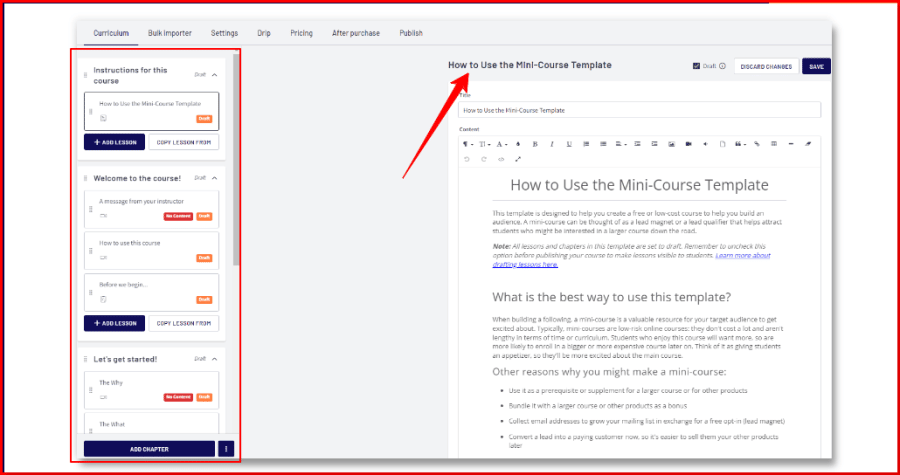
The goal of the Mini-Course template is to facilitate the creation of a low-cost or free training program that will help you expand your clientele.
You might think of a mini-course as a lead magnet or a lead qualifier that helps bring in potential students for a full-length course.
Mini-courses are great for getting your intended audience interested in signing up, which is essential when you’re first starting out.
These online classes are typically short, inexpensive, and easy to fit into a busy schedule.
3. Pre-Sell
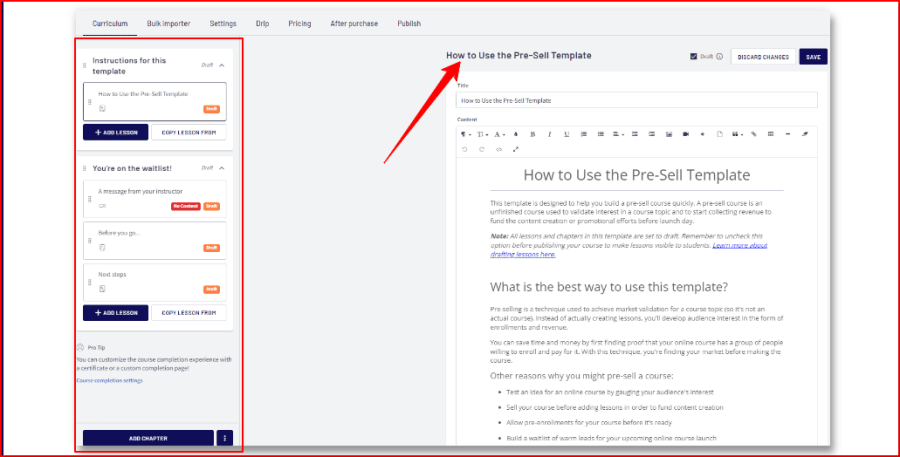
Pre-selling is a strategy for determining whether or not there is demand for a prospective lecture topic. This implies generating revenue or subscribers before writing any content or releasing any finished content.
You may create a pre-sell course efficiently with the aid of this template. It is common practice to employ a “pre-sell course” to gauge student interest in a potential final product.
4. Webinar Replay
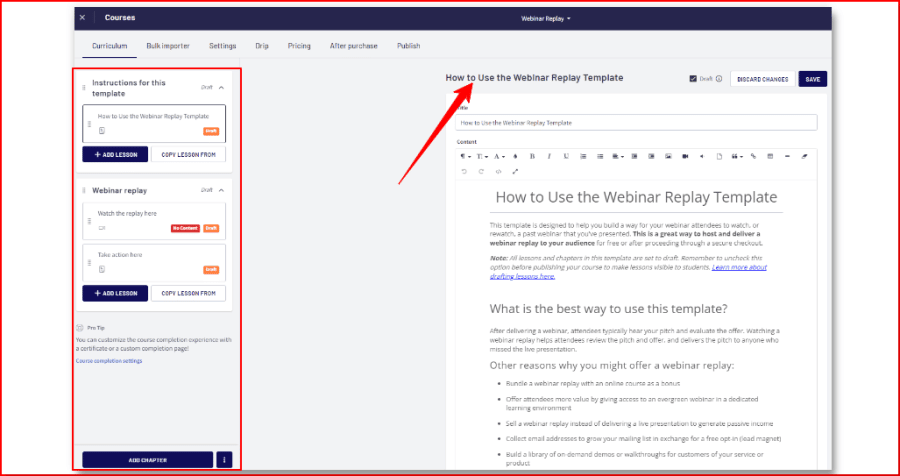
Webinar participants will have an opportunity to consider your presentation and value proposition after hearing it presented.
Viewing a webinar’s recording allows participants to study the presentation and offer at their leisure, and provides others who couldn’t make it the chance to catch up.
Using this template, you can quickly and easily create a system for your webinar guests to see your presentation at their convenience.
Not a course, but a mechanism to host and distribute a webinar recording to your target audience for free or after payment processing.
5. Flagship Course
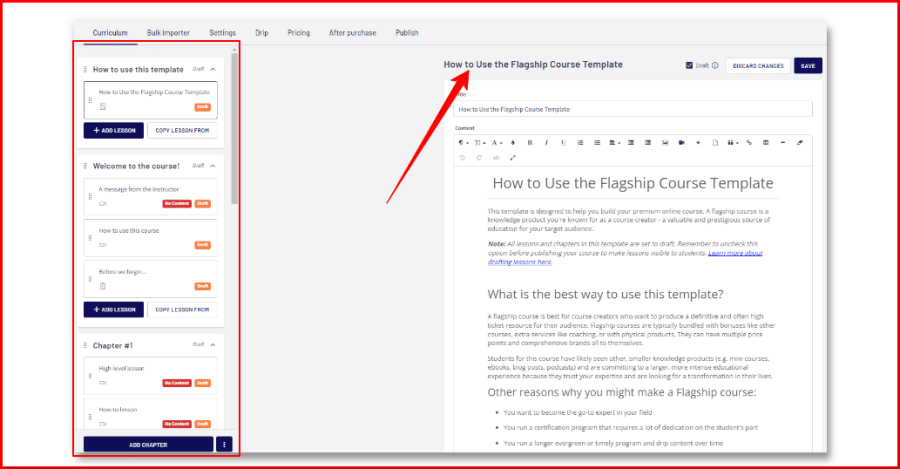
You can use this template to create a high-quality online course. The product you’re recognized for as a course producer can be thought of as a flagship course.
For your intended audience, it is an important and reputable source of information.
A flagship course is best for course developers who wish to create a precise and more expensive resource for their field of expertise.
6. Membership Resource Library
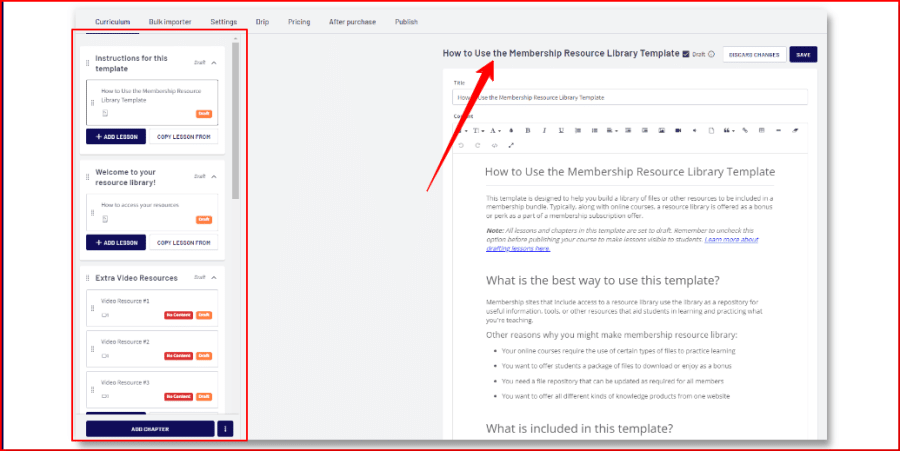
Membership sites with access to a resource library use the library as a clearinghouse for helpful data, instruments, or other resources that help students learn and put what you’re teaching into practice.
This would be a terrific addition to an existing Bundle deal.
This template is made to assist you in compiling a library of documents or other materials for a membership package.
A resource library is typically provided as a bonus or benefit in addition to online courses as part of a membership subscription offer.
What Kind Of Support Does Thinkific Offer?
The customer service offered by Thinkific is limited to business days (Monday through Friday).
Their responses are never inconsiderate or lacking in information.
You may easily get the majority of the answers on your own thanks to the fact that they provide a very extensive knowledge base on their Help Center. This is done to counter this.
They also provide a free course titled “The Thinkific Fast Track” in their Training Center. This course is designed to teach beginners how to effectively create, promote, and sell their own online courses.
If you’re comparing platforms, don’t miss the 35% off LearnWorlds discount, another solid option for online course creators.
What languages are supported by Thinkific?
More than 30 languages are now supported by Thinkific thanks to the recent addition of Latvian, which is shown below.
- Czech
- Danish
- Dutch
- English
- Estonian
- Finnish
- French
- Georgian
- German
- Greek
- Hungarian
- Italian
- Icelandic
- Croatian
- Japanese
- Korean
- Latvian
- Lithuanian
- Mandarin
- Mandarin
- Norwegian
- Polish
- Portuguese
- Romanian
- Russian
- Serbian
- Slovenian
- Spanish
- Mexican
- Swedish
- Thai
- Turkish
- Vietnamese
Students can now choose a certain language for your course website thanks to Thinkific’s new multi-language feature.
Under Settings > Learning content, you can choose the language that will be used to show your website.
Simply said, unless there is an auto-translation feature, it is how any database-driven product will behave.
For course authors working in non-English languages, the fact that it is simple to switch to a foreign language for Thinkific’s main components is likely to be a considerable time saver.
What Are The Other Factors That Must Include In Thinkific?
Thinkific offers a tremendous breadth of functions at a very affordable price, as anyone who has worked in the e-learning sector for the previous couple of decades would appreciate.
Nevertheless, there are gaps that will prevent it from being used by some course sellers, and these are all shortcomings that are typical of this type of platform.
1. No SCORM Support
Though Thinkific can host and deliver courses made in popular authoring programs like Articulate and Captivate.
It doesn’t really utilize these programs’ SCORM packaging features. Thinkific would not be the best option if you have a compelling argument for using one of the major e-learning standards.
2. Education Credit Capabilities
In Thinkific, you can estimate how many hours it will take to complete a course, but you cannot specify how much-continuing education is offered for a course.
Although there may be workarounds, this will be a substantial hurdle for most course providers who concentrate on offering continuing education credit to use Thinkific.
3. No Multi-Tenancy Option Is Available
The ability to generate and manage many instances of a platform under a unified platform is referred to as multi-tenancy.
This can be quite useful if, for example, you are a training organization with a large number of corporate clients, each of whom wants their own customized instance of the platform for delivering and managing their users.
While Thinkific’s Group functionality helps you to get started, it is not the same as multi-tenancy.
Thinkific Customers Reviews & Testimonials
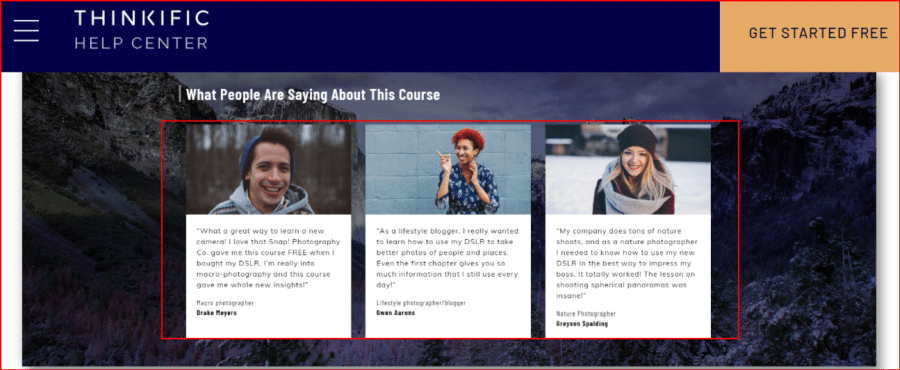
Here is what customers say about Thinkific:
G2
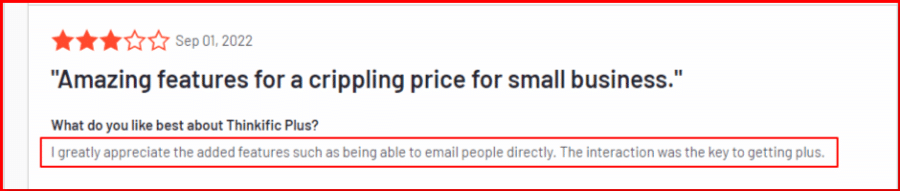
“Excellent online learning platform for associations”
What do you like best?
Thinkific is an intuitive and easy-to-use platform. Building classes to respond in an agile manner to the learning needs in our association has been seamless.Thinkific’s support team is also helpful and responsive. Registering participants and managing student needs is also easy, and the automated communication and certification offer stress-free class management options!
“Easy to get off the ground”
What do you like best?
Last year when I decided to create an online course I was looking for a platform I could test before committing. Thinkific has a VERY robust free version that caught my attention.I set up my new course here so I could BETA test it before its official launch. Because this was a new offering I wanted to have as simple as a setup process as possible, and one that was easy for my newbie students to use.
THIS is exactly what Thinkific delivered.
Trustpilot
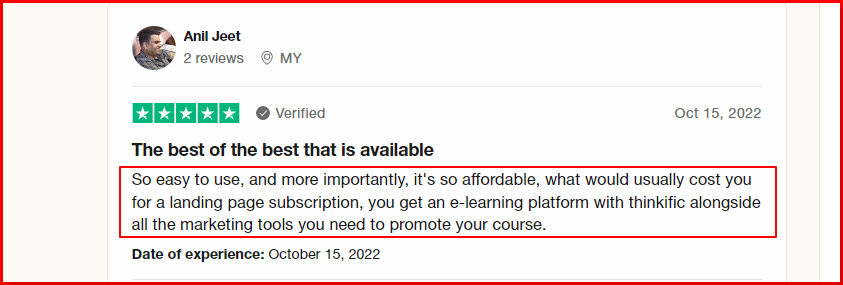
I had spent a lot of time checking and…
I had spent a lot of time checking and testing various options to sell online courses before deciding for Thinkific – which I liked the most.Their pricing plan compares favorable with most of the services and designed well: you can try how it works for free, then tailor your subscription as your business grows.
Of course, you have to make some compromises, but even the basic plans offer surprisingly elegant appearance and enough options for customization. I am also satisfied with their customer support.
Their user interface is very intuitive and their technical documentation is detailed and well-structured, although I believe that they could add some more sections describing/highlighting what you “cannot do” (sometimes such simple statements/lists on what cannot be customized/adjusted/changed could save long hours for users and result in less correspondence with the customer support).
I miss WooCommerce integration. Overall, I am satisfied with their service and happy to recommend Thinkific.
I like so many others in 2020
I like so many others in 2020, was sitting praying, and wondering how to move forward. And I was invited to a session by a world-renowned Speaker and coach when the topic of creating online courses came up.
So I did some research and came across thinkific among others, to be honest, I liked the fact that I could legitimately set up my training for free, while I got my bearings, with the option to upgrade, which I fully plan to do.
I have not been able to offer my course until now, hence the reason I’m still on free, because PayPal was not available or connected to banks in my country.I finally got a breakthrough in this area, so I’m in the marketing phase.
Also, I latch on to any and everything Xayli Barclay says. Thank you Thinkific
Conclusion: Is Thinkific Worth The Hype?
By the end of this Thinkific review, I’m sure you will have a good idea of what to expect from the platform.
It is a legit, simple drag-and-drop editing platform with flexible course and page building tools. It also has strong marketing features and allows for a custom mobile app.
It may not have many gamification features, but still it’s a powerful tool in an affordable price range to get started with.
It’s a solid 4.5/5 tool and definitely worth a try if you plan on selling courses online.
Frequently Asked Questions
Is there a free version of Thinkific?
No, Thinkific’s doesnot offer any free version. Instead it offers you a 30 days free trial period time of all the paid plans. Now you can enjoy the paid features for free for 30 days.
Does Thinkific work with Wix?
If you use Zapier, you can connect Wix Automations and Thinkific without having to write any code. Actions that set off your pre-established automation rules. Immediately begin doing this!
Does Thinkific have an API?
Yes, Developers can access Thinkific data through the APIs and add new features to the platform.
