
Eventbrite’s 2025 annual report shows that nearly 4.6 million events were hosted on its platform in 2025. With that many events competing for attention, getting yours in front of the right people matters more than ever.
That’s where event submission sites help. They let you list your conference, webinar, workshop or meetup where people are already looking for things to do, and many free event listing sites let you post at no cost.
In this guide, you’ll find 60+ event listing websites, the top 10 for US events, the best free options and simple steps to get your event approved.
60+ Best Event Submission Sites List
Here’s our full list of event submission sites, sorted by Domain Authority, with the category, free listing option and region for each.
Domain Authority (DA) is a Moz metric scored 1–100 that changes month to month, so check the latest values with a live DA tool.
49 of the 65 sites let you post a basic listing for free, and 15 focus on US audiences. If your event is in the US, skip the India, UK and Australia sites unless you're targeting those countries too.
What Are the Top 10 Event Submission Sites in the US?
Start with Eventbrite, Facebook Events, LinkedIn Events and Google Business Profile, then add one local and one niche site.
| S. No. | Site | Best For | Free to List? |
|---|---|---|---|
| 1 | Eventbrite | Ticketed events of any size | Free for free events, fees on paid tickets |
| 2 | Facebook Events | Local and community events | Free |
| 3 | LinkedIn Events | Webinars, B2B and professional events | Free |
| 4 | Google Business Profile | Events at your business location | Free |
| 5 | Meetup | Recurring groups and meetups | Organizer subscription needed |
| 6 | Patch | Neighborhood events in US towns | Free |
| 7 | Nextdoor | Hyper-local community events | Free |
| 8 | AllEvents | City event discovery | Free |
| 9 | Luma | Tech, startup and online events | Free |
| 10 | 10times | Trade shows and conferences | Free |
8 of the top 10 are free to list on, so you can reach a US audience without spending anything. Meetup and Eventbrite's paid tickets are the only places where costs come in.
What Are Event Submission Sites?
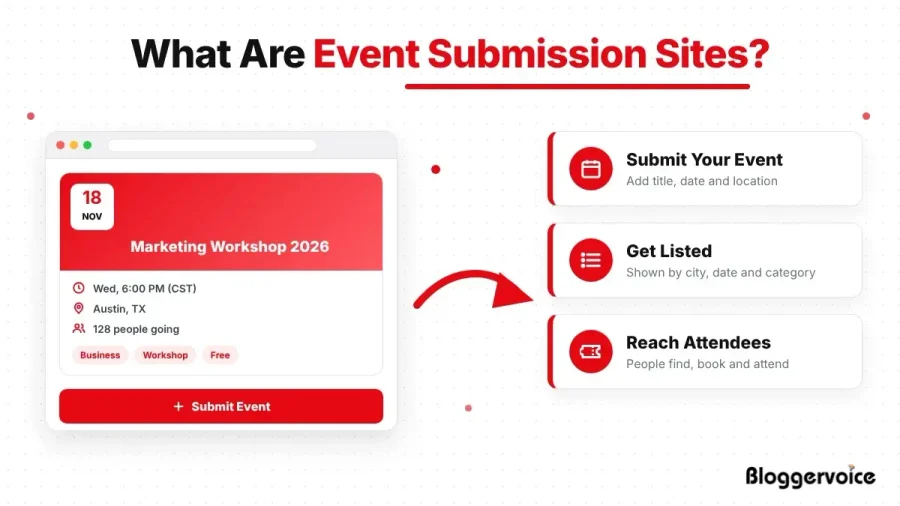
Event submission sites are platforms where organizers post event details so people can find, browse and register for them.
They range from ticketing tools like Eventbrite to community calendars like Patch and professional directories like 10times. You add the title, date, location, description and images, and the site publishes your event as a listing that people can discover by date, city or category.
How We Picked the Best Event Submission Sites?
We did not dump a giant list of URLs on the page and call it a day, each platform above earned its spot against a short set of practical checks so you can trust that the recommendation fits your event.
Here is what we weighed:
- Relevance to real event categories, not vague "any event" claims
- Audience size and quality, since a small, targeted crowd often beats a huge, random one
- Event categories supported, from webinars to trade shows to concerts
- Geographic reach, whether the site works globally, nationally, or in one city
- Free submission availability, and how "free" is actually defined
- Ease of submission, because a two-hour form kills momentum
- Discovery potential, meaning real search and browse features that help people find you
That filter keeps this list useful instead of bloated.
What Are the Best Free Event Listing Sites?
Facebook Events, LinkedIn Events, Google Business Profile, Patch, Nextdoor, AllEvents, Luma and 10times are free to list on, and Eventbrite is free for free events.
"Free" means different things on different event listing sites, so it helps to know the three types:
| Type | What It Means | Examples |
|---|---|---|
| Completely free | No cost to list or promote a basic event | Facebook Events, LinkedIn Events, Patch, Nextdoor, AllEvents |
| Free for free events | Free to list, but fees apply when you sell tickets | Eventbrite, TicketLeap, Eventzilla, Ticket Tailor |
| Paid or subscription | You pay to create events or to get a listing | Meetup (organizer plan), TSNN, EventsEye |
If your event is free to attend, almost every big platform costs you nothing. Fees usually start only when you sell tickets or want a featured spot.
How You Should Choose the Right Event Submission Site?
Match the site to your audience, location, event type and budget before you post.
With dozens of options, a quick decision framework saves time. Run any platform through these questions before you commit:
- Audience: Does the site actually reach your target attendees, or just a big generic crowd?
- Geography: Is it global, national, or local, and does that match where your attendees are?
- Event type: Does it specialize in conferences, webinars, concerts, or meetups like yours?
- Cost: Is the basic listing truly free, or free only until tickets sell?
- Discovery: Can visitors search and browse, so people find you without a direct link?
- Promotion: Are paid boosts available when you want extra reach later?
- Moderation: Does it review listings before they go live, and how long does that take?
Score two or three finalists against this list and the right choice usually becomes obvious.
Niche forums are another place where your attendees already hang out, so check out these forum submission sites too.
What Are the Best Local Event Listing Websites in the USA?
For local US events, use Patch, Nextdoor, Facebook Events, Google Business Profile and your city's own event calendar.
Local event listing sites put your event in front of people who live nearby and are most likely to show up:
- Patch covers neighborhood news and events in towns across the US.
- Nextdoor reaches verified neighbors in your area.
- Google Business Profile lets you add event updates that can show up in Google Search and Maps.
- Events in America, Events.org and EventCrazy list events across US states and cities.
- Local newspaper and city calendars often accept free community event submissions, so search "[your city] events calendar submit".
For extra local reach, you can also post your event on these local classified sites.
How Do Event Listing and Submission Work Together?
In many cases, a single platform performs both functions. An organizer submits an event, and the platform publishes it as a listing that visitors can discover.
Think of it this way: event submission is the entrance, while event listing is the display window. You submit your event through the first, and potential attendees discover it through the second.
For event promotion, you don't necessarily need to choose one over the other. Instead, look for platforms that let you submit your event and showcase it to a relevant audience.
The more useful and active the platform, the better your chances of attracting visitors, generating referral traffic, and putting your event in front of people who actually care about it.
After all, an event can have the best speakers, venue, and snacks in town, but if nobody knows it exists, those snacks may never get the audience they deserve.
If you want to get additional visibility from those event visuals, image submission sites can give you another place to showcase them.
How Do You Submit an Event the Right Way?
Create an account, add complete event details and images, preview your listing, then publish and share it.
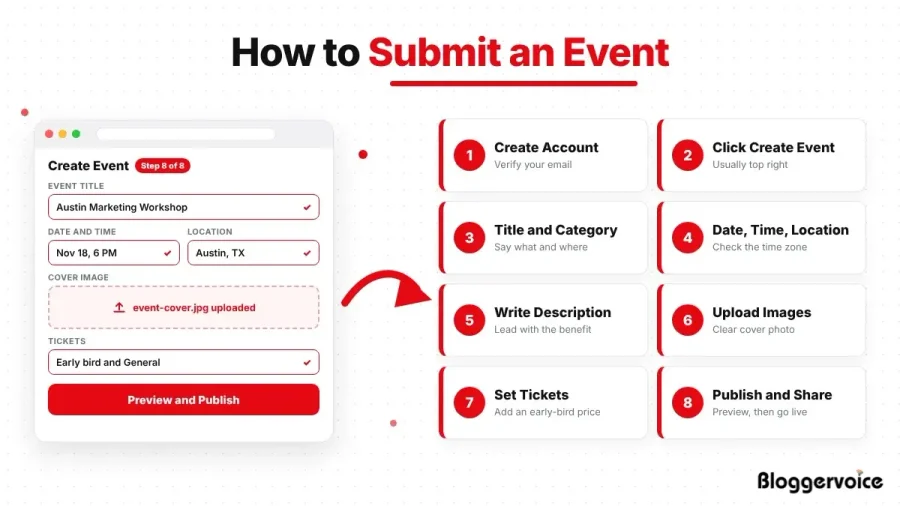
The process is almost the same on every event submission site.
Follow these steps on almost any event submission site, and you will rarely hit a wall:
Step 1: Create or Log Into Your Account
Sign up with your email, Google or Facebook account. Most event listing websites ask you to verify your email before you can post anything, so check your inbox (and spam folder) for the link.
Step 2: Click “Create Event”
Look for the “Create Event”, “Add Event” or “Submit Event” button. It’s usually in the top-right corner of the page or dashboard.
Step 3: Add a Clear Title and the Right Category
Write a title that says what the event is and where it’s happening, like “Austin Small Business Marketing Workshop”. Then choose the category that really matches, because a wrong tag can bury your listing.
Step 4: Enter the Date, Time and Location
Add the start and end time, and double-check the time zone, since a one-hour mistake can empty your room. For online events, choose “Online” and add your webinar link instead of an address.
Step 5: Write a Helpful Description
Start with what attendees will gain, then add the key details: speakers, agenda, parking, accessibility and who the event is for. Keep paragraphs short so it’s easy to read on a phone.
If you have an agenda, brochure or speaker list, you can also share it on these PDF submission sites.
Step 6: Upload Your Images
Add a clear cover image or poster in the size the site recommends. Blurry or missing images make an event look like spam and scare people off faster than a high ticket price.
Step 7: Set Ticket Types and Prices
Choose free or paid tickets and set how many are available. Add an early-bird price if you want to reward people who sign up early.
Step 8: Preview, Publish and Share
Preview the listing and read it once to catch typos and broken links. Then publish it and share the live link with your email list and on social media. Save the confirmation email or event URL somewhere handy so you can update the details later.
For quick event updates and countdown posts, these microblogging sites help you reach more people.
Steps 3, 5 and 6 decide whether people click on your event, so spend most of your time on the title, description and images.
What Are the Common Mistakes That Get Your Listing Rejected?
A few slip-ups cause most ignored or bounced posts. Keep an eye out for these:
- Vague titles like "Fun Night Out" tell search engines nothing. Name the act, the place, or the theme instead.
- Missing images make your event look like spam, so always add a clean cover photo.
- Duplicate submissions on the same site can trip filters and hide every copy you posted.
- Wrong category or location tags send your listing to the wrong crowd entirely.
- Walls of text with no line breaks lose readers in seconds.
How Event Submission Sites Help With SEO?
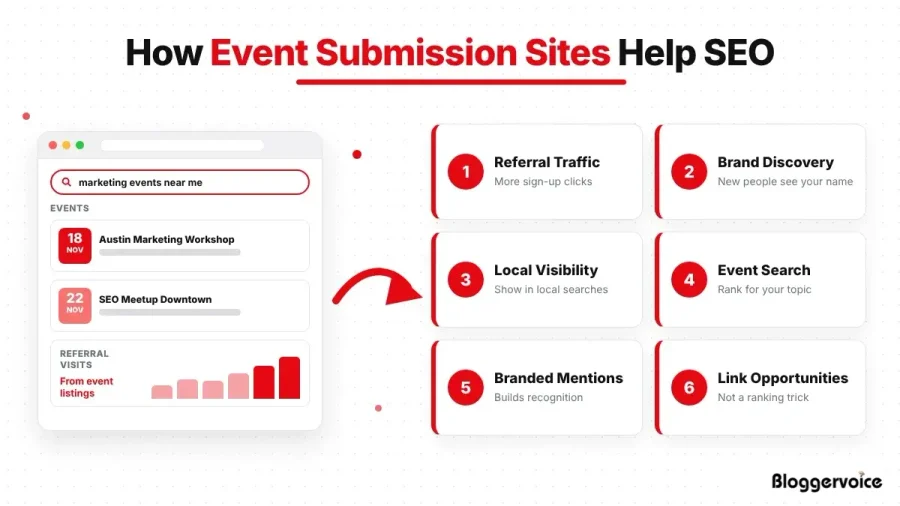
They help mainly through referral traffic, brand discovery and local visibility, not by boosting your domain authority.
Older guides sell event submissions as a backlink machine, promising higher domain authority if you post everywhere.
That advice is dated and mostly wrong. Here is a more accurate picture of what these platforms do for your search presence today.
The real gains are practical:
- Referral traffic: People click through from the directory to your registration page.
- Brand discovery: New audiences see your name while browsing related events. For bigger events, you can also publish an announcement on free PR sites to reach more people.
- Local visibility: City calendars and Google-linked profiles help you appear in "near me" searches. For extra local reach, you can also post your event on local classified sites like Craigslist.
- Event-related search results: Big platforms rank well, so your event can show up in search when someone looks for your topic.
- Branded mentions: Your name and event circulate, which builds recognition over time.
- Link opportunities: Where a listing includes a real link to your site, that referral path has value, though it is not a magic ranking lever.
What you should not expect is a jump in your website's authority just because you listed on twenty directories. Search engines treat most of those links as directory links.
Post on event submission sites to reach people and support local and event signals, not to gain rankings.
Are Event Submission and Event Listing Sites the Same?
Not exactly. While event submission sites and event listing sites often overlap, they serve different purposes.
The easiest way to understand the difference is to look at what each type of platform does:
| Event Submission Websites | Event Listing Websites |
|---|---|
| Allow organizers to submit their events for publication. | Help visitors discover and browse upcoming events. |
| Focus on getting an event added to the platform. | Focus on displaying events to a target audience. |
| Usually require organizers to provide event details for approval. | Often organize events by category, location, date, or interest. |
| Help businesses, organizers, and marketers promote their events. | Help users find events they may want to attend. |
| Can generate referral traffic and promotional exposure. | Can increase event visibility and audience reach. |
If your event has a talk or workshop, answer related questions on these question and answer websites to bring in interested attendees.
Conclusion on Event Submission Sites
Event submission sites are one of the easiest ways to get your event in front of people who are already looking for something to attend.
Start with the big free platforms like Eventbrite, Facebook Events and LinkedIn Events, then add one or two local or niche event listing websites that match your audience. Write a clear title, add good images, double-check the details and share your listing everywhere. Do that for every event, and your audience will keep growing.
Frequently Asked Questions
What Are Event Submission Websites?
Event submission sites are platforms where organizers post events so people can find, browse, and register for them. They range from ticketing tools to community calendars and business directories.
What Are Event Listing Websites?
Event listing sites are directories or calendars that display upcoming events by date, location, or category. Attendees search them to decide what to attend, and organizers use them for free or paid exposure.
Are Event Listing Sites Good For SEO?
They help mainly through referral traffic, brand discovery, and local search visibility. They rarely lift your domain authority, so treat them as an audience channel rather than a ranking trick.
Which Event Submission Sites Are Free?
LinkedIn Events and Facebook Events are fully free to post. Eventbrite, TicketLeap, and Eventzilla are free for free events but charge fees once you sell tickets.
Can I Submit A Webinar To Event Listing Sites?
Yes. LinkedIn Events, Luma, Eventbrite, and 10times all support online events and webinars, and you list a virtual link instead of a venue address.
Should I Submit The Same Event To Multiple Websites?
Yes, but tailor each listing. Rewrite the description for each platform, match the right category, and avoid identical duplicate copy so your listings stay clean and readable.
