

A WordPress ping list is a list of update service URLs that WordPress notifies automatically every time you publish a new post.
WordPress powers about 43% of all websites, according to W3Techs, and every WordPress site pings Ping-O-Matic by default.
The best WordPress ping list in 2026 is a short, verified one, starting with Ping-O-Matic (rpc.pingomatic.com), paired with Google Search Console and IndexNow for fast indexing.
Below you’ll find our updated WordPress ping list, free ping submission sites, simple steps to add ping services in WordPress and what actually gets your posts indexed faster today.
Full WordPress Ping List 2026
Here is our full ping submission site list with every update service URL. Many of these are older services, so test any URL before you add it to WordPress.
| S.No. | Websites |
|---|---|
| 1 | http://blogsearch.google.com/ping/RPC2 |
| 2 | http://bblog.com/ping.php |
| 3 | http://bitacoras.net/ping |
| 4 | http://blog.goo.ne.jp/XMLRPC |
| 5 | http://blogdb.jp/xmlrpc |
| 6 | http://blogmatcher.com/u.php |
| 7 | http://bulkfeeds.net/rpc |
| 8 | http://coreblog.org/ping/ |
| 9 | http://mod-pubsub.org/kn_apps/blogchatt |
| 10 | http://www.lasermemory.com/lsrpc/ |
| 11 | http://ping.blo.gs/ |
| 12 | http://ping.bloggers.jp/rpc/ |
| 13 | http://ping.feedburner.com |
| 14 | http://ping.rootblog.com/rpc.php |
| 15 | http://pingoat.com/goat/RPC2 |
| 16 | http://rpc.blogbuzzmachine.com/RPC2 |
| 17 | http://rpc.blogrolling.com/pinger/ |
| 18 | http://rpc.pingomatic.com |
| 19 | http://rpc.weblogs.com/RPC2 |
| 20 | http://topicexchange.com/RPC2 |
| 21 | http://trackback.bakeinu.jp/bakeping.php |
| 22 | http://www.bitacoles.net/ping.php |
| 23 | http://www.blogoole.com/ping/ |
| 24 | http://www.blogpeople.net/servlet/weblogUpdates |
| 25 | http://www.blogshares.com/rpc.php |
| 26 | http://www.blogsnow.com/ping |
| 27 | http://www.blogstreet.com/xrbin/xmlrpc.cgi |
| 28 | http://www.mod-pubsub.org/kn_apps/blogchatter/ping.php |
| 29 | http://www.newsisfree.com/RPCCloud |
| 30 | http://www.newsisfree.com/xmlrpctest.php |
| 31 | http://www.snipsnap.org/RPC2 |
| 32 | http://www.weblogues.com/RPC/ |
| 33 | http://xmlrpc.blogg.de |
| 34 | http://rpc.pingomatic.com/ |
| 35 | http://services.newsgator.com/ngws/xmlrpcping.aspx |
| 36 | http://rpc.twingly.com |
| 37 | http://ping.syndic8.com/xmlrpc.php |
| 38 | http://blogsearch.google.us/ping/RPC2 |
| 39 | http://blogsearch.google.tw/ping/RPC2 |
| 40 | http://blogsearch.google.sk/ping/RPC2 |
| 41 | http://blogsearch.google.se/ping/RPC2 |
| 42 | http://blogsearch.google.ru/ping/RPC2 |
| 43 | http://blogsearch.google.ro/ping/RPC2 |
| 44 | http://blogsearch.google.pt/ping/RPC2 |
| 45 | http://blogsearch.google.pl/ping/RPC2 |
| 46 | http://blogsearch.google.nl/ping/RPC2 |
| 47 | http://blogsearch.google.lt/ping/RPC2 |
| 48 | http://blogsearch.google.jp/ping/RPC2 |
| 49 | http://blogsearch.google.it/ping/RPC2 |
| 50 | http://blogsearch.google.in/ping/RPC2 |
| 51 | http://blogsearch.google.ie/ping/RPC2 |
| 52 | http://blogsearch.google.hr/ping/RPC2 |
| 53 | http://blogsearch.google.gr/ping/RPC2 |
| 54 | http://blogsearch.google.fr/ping/RPC2 |
| 55 | http://zing.zingfast.com |
| 56 | http://zhuaxia.com/rpc/server.php |
| 57 | http://xping.pubsub.com/ping/ |
| 58 | http://www.zhuaxia.com/rpc/server.php |
| 59 | http://www.xianguo.com/xmlrpc/ping.php |
| 60 | http://www.weblogues.com |
| 61 | http://www.snipsnap.org |
| 62 | http://www.popdex.com/addsite.php |
| 63 | http://www.popdex.com |
| 64 | http://www.mod-pubsub.org/ping.php |
| 65 | http://www.lasermemory.com |
| 66 | http://www.imblogs.net/ping/ |
| 67 | http://www.holycowdude.com/rpc/ping/ |
| 68 | http://www.feedsky.com/api/RPC2 |
| 69 | http://www.catapings.com/ping.php |
| 70 | http://www.blogsdominicanos.com/ping/ |
| 71 | http://rpc.technorati.com/rpc/ping |
| 72 | http://rpc.blogcatalog.com/ |
| 73 | http://api.my.yahoo.com/RPC2 |
| 74 | http://api.my.yahoo.com/rss/ping |
| 75 | http://ping.feedburner.com/ |
| 76 | http://api.feedster.com/ping |
| 77 | http://rpc.icerocket.com:10080 |
| 78 | http://www.bloglines.com/ping |
| 79 | http://a2b.cc/setloc/bp.a2b |
| 80 | http://api.moreover.com/ping |
| 81 | http://api.moreover.com/RPC2 |
| 82 | http://api.my.yahoo.co.jp/RPC2 |
| 83 | http://api.my.yahoo.com/ping |
| 84 | http://audiorpc.weblogs.com/RPC2 |
| 85 | http://bitacoras.net/ping/ |
| 86 | http://blog.goo.ne.jp |
| 87 | http://blogdb.jp |
| 88 | http://blogdigger.com/RPC2 |
| 89 | http://blogoole.com/ping/ |
| 90 | http://blogoon.net/ping/ |
| 91 | http://blogpeople.net/ping |
| 92 | http://blogsearch.google.ae/ping/RPC2 |
| 93 | http://blogsearch.google.at/ping/RPC2 |
| 94 | http://blogsearch.google.be/ping/RPC2 |
| 95 | http://blogsearch.google.bg/ping/RPC2 |
| 96 | http://blogsearch.google.ca/ping/RPC2 |
| 97 | http://blogsearch.google.ch/ping/RPC2 |
| 98 | http://blogsearch.google.cl/ping/RPC2 |
| 99 | http://blogsearch.google.co.cr/ping/RPC2 |
| 100 | http://blogsearch.google.co.hu/ping/RPC2 |
| 101 | http://blogsearch.google.co.id/ping/RPC2 |
| 102 | http://blogsearch.google.co.il/ping/RPC2 |
| 103 | http://blogsearch.google.co.in/ping/RPC2 |
| 104 | http://blogsearch.google.co.it/ping/RPC2 |
| 105 | http://blogsearch.google.co.jp/ping/RPC2 |
| 106 | http://blogsearch.google.co.ma/ping/RPC2 |
| 107 | http://blogsearch.google.co.nz/ping/RPC2 |
| 108 | http://blogsearch.google.co.th/ping/RPC2 |
| 109 | http://blogsearch.google.co.uk/ping/RPC2 |
| 110 | http://blogsearch.google.co.ve/ping/RPC2 |
| 111 | http://blogsearch.google.co.za/ping/RPC2 |
| 112 | http://blogsearch.google.com.ar/ping/RPC2 |
| 113 | http://blogsearch.google.com.au/ping/RPC2 |
| 114 | http://blogsearch.google.com.br/ping/RPC2 |
| 115 | http://blogsearch.google.com.co/ping/RPC2 |
| 116 | http://blogsearch.google.com.do/ping/RPC2 |
| 117 | http://blogsearch.google.com.mx/ping/RPC2 |
| 118 | http://blogsearch.google.com.my/ping/RPC2 |
| 119 | http://blogsearch.google.com.pe/ping/RPC2 |
| 120 | http://blogsearch.google.com.sa/ping/RPC2 |
| 121 | http://blogsearch.google.com.sg/ping/RPC2 |
| 122 | http://blogsearch.google.com.tr/ping/RPC2 |
| 123 | http://blogsearch.google.com.tw/ping/RPC2 |
| 124 | http://blogsearch.google.com.ua/ping/RPC2 |
| 125 | http://blogsearch.google.com.uy/ping/RPC2 |
| 126 | http://blogsearch.google.com.vn/ping/RPC2 |
| 127 | http://blogsearch.google.de/ping/RPC2 |
| 128 | http://blogsearch.google.es/ping/RPC2 |
| 129 | http://blogsearch.google.fi/ping/RPC2 |
| 130 | http://blogsnow.com/ping |
| 131 | http://blogstreet.com/xrbin/xmlrpc.cgi |
| 132 | http://blogupdate.org/ping/ |
| 133 | http://effbot.org/rpc/ping.cgi |
| 134 | http://feedsky.com/api/RPC2 |
| 135 | http://holycowdude.com/rpc/ping/ |
| 136 | http://imblogs.net/ping/ |
| 137 | http://lasermemory.com/lsrpc/ |
| 138 | http://newsisfree.com/RPCCloud |
| 139 | http://packetmonster.net/xmlrpc.php |
| 140 | http://ping.amagle.com/ |
| 141 | http://ping.bitacoras.com |
| 142 | http://ping.blogg.de/ |
| 143 | http://ping.blogmura.jp/rpc/ |
| 144 | http://ping.blogoon.net/ |
| 145 | http://ping.blogs.yandex.ru/RPC2 |
| 146 | http://ping.cocolog-nifty.com/xmlrpc |
| 147 | http://ping.exblog.jp/xmlrpc |
| 148 | http://ping.fakapster.com/rpc |
| 149 | http://ping.fc2.com/ |
| 150 | http://ping.feeds.yahoo.com/RPC2/ |
| 151 | http://ping.kutsulog.net/ |
| 152 | http://ping.myblog.jp |
| 153 | http://ping.namaan.net/rpc |
| 154 | http://ping.snap.com/ping/RPC2 |
| 155 | http://ping.weblogalot.com/rpc.php |
| 156 | http://ping.weblogs.se/ |
| 157 | http://ping.wordblog.de/ |
| 158 | http://pinger.blogflux.com/rpc |
| 159 | http://pingoat.com/ |
| 160 | http://pingqueue.com/rpc/ |
| 161 | http://popdex.com/addsite.php |
| 162 | http://r.hatena.ne.jp/rpc |
| 163 | http://rcs.datashed.net |
| 164 | http://rcs.datashed.net/RPC2/ |
| 165 | http://rpc.bloggerei.de/ping/ |
| 166 | http://rpc.britblog.com/ |
| 167 | http://rpc.newsgator.com/ |
| 168 | http://rpc.reader.livedoor.com/ping |
| 169 | http://rpc.tailrank.com/feedburner/RPC2 |
| 170 | http://rpc.technorati.jp/rpc/ping |
| 171 | http://rpc.wpkeys.com |
| 172 | http://snipsnap.org/RPC2 |
| 173 | http://syndic8.com/xmlrpc.php |
| 174 | http://thingamablog.sourceforge.net/ping.php |
| 175 | http://topicexchange.com |
| 176 | http://wasalive.com/ping/ |
| 177 | http://weblogues.com/ping/ |
| 178 | http://weblogues.com/RPC/ |
| 179 | http://www.a2b.cc |
| 180 | http://www.a2b.cc/setloc/bp.a2b |
| 181 | http://www.blogdigger.com/RPC2 |
| 182 | http://www.blogoon.net/ping/ |
| 183 | http://www.blogpeople.net |
| 184 | http://www.blogroots.com |
| 185 | http://1470.net/api/ping |
| 186 | http://rpc.icerocket.com:10080/ |
| 187 | http://www.blogroots.com/tb_populi.blog?id=1 |
- The blogsearch.google URLs no longer work. Google Blog Search was shut down, so these servers don’t accept pings anymore.
- Many older services, like Technorati, Feedburner ping, Yahoo, Bloglines and IceRocket, have closed too.
- Only add URLs you’ve tested. One working aggregator like Ping-O-Matic does more than 100 dead servers.
Which Are the Best Free Ping Submission Sites?
The best free ping submission sites are Ping-O-Matic, Pingler, PingMyLinks, Pingfarm and Feed Shark. For Google and Bing, Search Console and IndexNow work far better than any ping tool.
| Tool | Free | Best For | Notes |
|---|---|---|---|
| Ping-O-Matic | Yes | WordPress and any blog | The WordPress default, run since 2004 |
| Pingler | Yes (basic) | Pinging single URLs | Paid plans add scheduled pings |
| PingMyLinks | Yes | Quick manual pings | Pings many services in one click |
| Pingfarm | Yes | Small sites | Simple manual pinging |
| Feed Shark | Yes | RSS feeds | Pings feed directories |
| Google Search Console | Yes | Google indexing | Request indexing for any URL |
| Bing Webmaster Tools and IndexNow | Yes | Bing, Yandex and others | Instantly notifies supporting search engines |
Online ping tools change often, so check a tool is still online before you rely on it. For Google, submitting your page in Search Console is the most reliable option.
What Is Ping SEO?
Ping SEO is the practice of notifying update services when you publish or update a page, so your new content gets discovered faster.
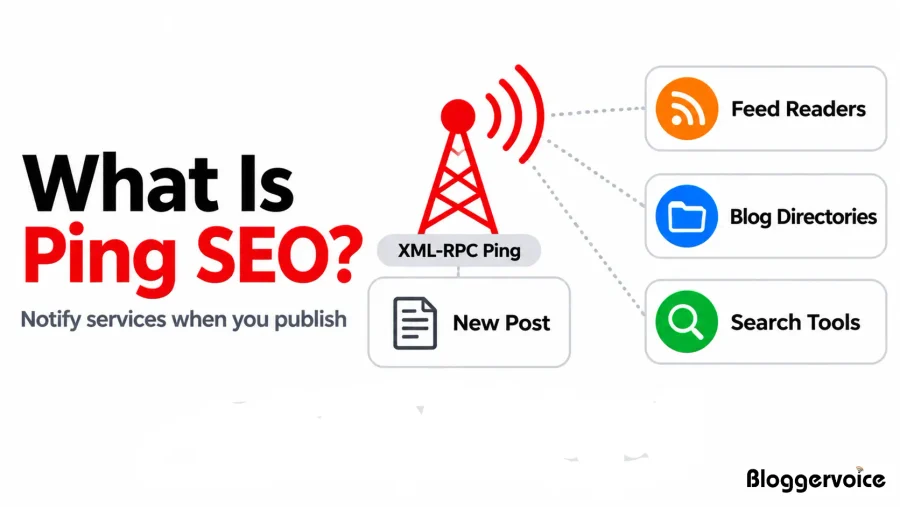
WordPress does this through XML-RPC, a built-in feature that sends your blog name and new post URL to every service in your Update Services list.
These services act like messengers. They tell feed readers, blog directories and other search tools that fresh content is live.
Ping SEO helps with discovery, not rankings. Google finds new pages mainly through links and sitemaps, as explained in its Search Central documentation, and ranks them based on helpful content, relevance and quality.
Our SEO guide explains how crawling, indexing and ranking work together.
What Is Ping Submission?
Ping submission means notifying search tools, blog directories and feed readers that your website has new or updated content.
There are two ways to do it:
- Automatic pinging: WordPress sends a ping to every URL in your Update Services list each time you publish.
- Manual ping submission: You enter your website URL into an online ping tool, which notifies several services for you. This is useful for sites that aren’t on WordPress.
For Google, the best “submission” is the URL Inspection tool in Search Console, since Google no longer accepts pings.
What Are The Benefits Of Using A WordPress Ping List?
A WordPress ping list helps new posts get discovered faster, shows your site is active and gives new blogs a small visibility boost.

1. Faster Discovery of New Posts
Pinging tells update services about your post the moment you publish it.
With a WordPress ping list in your Update Services settings, WordPress sends the notification instantly, so your post can be picked up much sooner.
This works best for blogs that publish often, like news sites, tutorials and trending topics, where being found early matters most. If you create video tutorials too, share them on video submission sites for extra reach.
2. Helpful for New Blogs
New websites don’t get crawled often, and ping submission helps their first posts get noticed.
Pinging gives these sites an extra way to announce new content. Use it alongside a sitemap and Google Search Console, and your first posts have a much better chance of getting found quickly.
Listing your new site on trusted business listing sites gives search engines another way to find it.
3. Wider Content Distribution
One ping can share your update with several directories and feed readers at once.
Services like Ping-O-Matic act as aggregators. You send one ping, and they pass it on to multiple services for you. That means your post reaches more blog directories, feed readers and content tools without you submitting it to each one manually.
You can also submit your site to quality web directories for even more visibility.
4. Saves Time Through Automation
Once your ping list is set up, WordPress does the work for you every time you publish.
You only need to add your ping URLs once, under Settings → Writing → Update Services. After that, every new post is pinged automatically, with no extra tools, plugins or manual steps. It’s one of the few SEO tasks you can set up in two minutes and then forget about.
5. Shows Your Site Is Active
Regular pings tell update services that your site publishes new content consistently.
Blogs that publish and ping on a steady schedule look active and well maintained to directories and feed readers. For Google, though, an updated sitemap and good internal links matter much more than pings, so treat pinging as a helper, not your main indexing method.
A WordPress ping list is free, automatic and takes two minutes to set up, but it works best as a support tool. Keep your ping list short, avoid mass ping tools, and pair it with Search Console and IndexNow for the fastest indexing.
How to Add a Ping List in WordPress Step by Step?
Go to Settings → Writing in your WordPress dashboard, paste your ping URLs into the Update Services box, one per line, and click Save Changes.
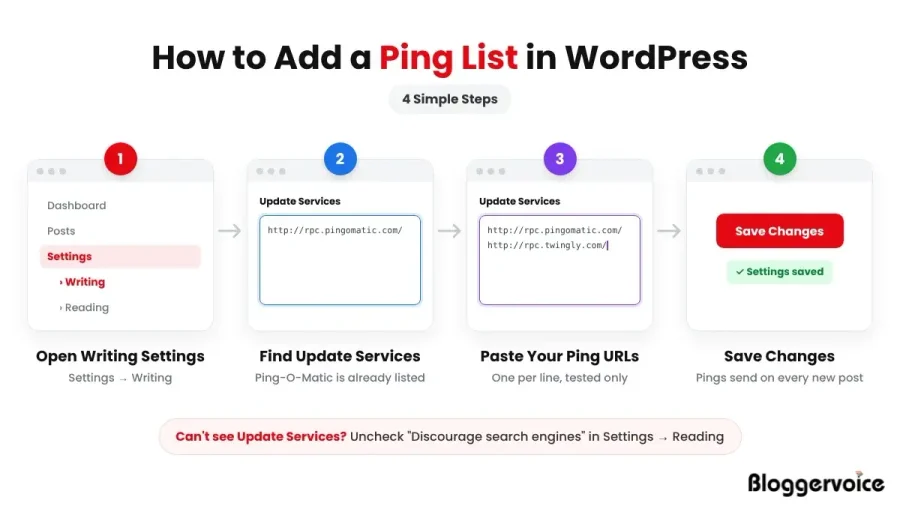
Step 1: Open Writing Settings
In your WordPress dashboard, go to Settings → Writing.
Step 2: Find Update Services
Scroll down to the Update Services box. You’ll see http://rpc.pingomatic.com/ already listed.
Can’t see the box? Go to Settings → Reading and make sure “Discourage search engines from indexing this site” is unchecked. WordPress hides Update Services when this option is on.
Step 3: Paste Your Ping URLs
Add your ping URLs, one per line. Keep the list short and remove any you haven’t tested.
Step 4: Save Changes
Click Save Changes. From now on, WordPress pings these services every time you publish a post.
How to Verify If Your Post Is Indexed?
Here are steps to verify that your post is indexed:
site:yourdomain.com/post-url
Indexed or Needs Fix
How To Prevent Ping Spam In WordPress?
Prevent ping spam in WordPress by controlling how often your site sends update notifications to ping services.
WordPress triggers a ping every time you publish or update a post, which can flood update servers if you edit repeatedly.
Excessive pinging may cause some services to ignore your site or flag it as spam.
When you manage ping frequency wisely, you protect your domain reputation and keep your WordPress ping list clean and effective.
Why Does WordPress Ping on Every Update?
WordPress sends pings through XML-RPC each time you hit publish or click update on a post.
The system assumes every update could include new content that search engines should discover.
Even small edits like fixing a typo can trigger another ping notification and this behavior can create ping spam if you edit a post several times in a short period.
Here are the other ways to prevent Ping SEO spam:
- Controlling Ping Frequency
- Using Plugins To Limit Pings
- Best Safe Configuration Settings
- Recommended Workflow For Editing Posts
1. Controlling Ping Frequency
You can control ping frequency by limiting when WordPress sends notifications. One simple method involves preparing your article fully in draft mode before publishing it live.
When you avoid updating published posts multiple times, you reduce repeated pings to update services.
Some site owners remove all ping services temporarily while making large edits and add them back once the post is final.
This approach keeps your WordPress update service settings clean and prevents mass ping signals that look unnatural.
2. Using Plugins To Limit Pings
Several WordPress plugins help limit ping spam and manage XML-RPC notifications.
This method stops repeated alerts during multiple revisions. You can also disable XML-RPC partially through security plugins if you do not rely on remote publishing tools.
When you install a ping control plugin, check its last update date and compatibility with your WordPress version to avoid plugin conflicts.
3. Best Safe Configuration Settings
Keep your WordPress ping list short and verified instead of adding bulk ping sites from random blogs.
Add only trusted update services such as Ping-O-Matic, which remains widely used in blogging communities.
Avoid mass ping tools that promise instant ranking boosts because search engines do not rank pages based on ping volume. Leave XML-RPC enabled only if you need it for publishing or update notifications.
A clean setup with limited services works better than a long spammy list that sends mixed signals.
4. Recommended Workflow For Editing Posts
Follow a structured workflow to prevent ping spam while keeping content fresh. Write and format your article in draft mode until it feels complete and polished.
Publish once, then review carefully before making any additional updates. If you need major revisions later, disable ping services temporarily, update the content, and then re-enable them after finishing.
This simple routine keeps your WordPress ping SEO strategy safe, avoids unnecessary ping storms, and saves your site from looking like it presses the panic button every five minutes.
Does Ping Website SEO Still Work In 2026?
Ping SEO still works for blog directories and feed readers, but it has very little effect on Google, which relies on sitemaps, links and Search Console instead.
Ping services were once popular for notifying search engines about new or updated content. But the SEO landscape has changed with faster indexing tools and smarter algorithms.
Is Ping SEO Effective Today?
Pinging in SEO can still give signals to search engines that your content has been changed, but its impact on rankings is minimal.
Search Engines like Google or Bing are now relying more on structured sitemaps and crawling for indexing than on third-party ping requests.
Pinging may help smaller engines or niche directories notice updates faster. For major search engines, pinging is more of a speed booster than a ranking tool.
1. Ping vs Google Search Console
Submitting URLs directly to Google Search Console is far more reliable than using traditional ping services.
Search Console allows instant indexing requests for new pages or updated content, giving better control over how search discovers your site.
Ping services may still notify them indirectly, but the effect is slower and less predictable. If your goal is fast indexing then Google Search Console is the smarter option.
2. Ping List vs RSS Submission
A ping list notifies services instantly when you publish, while RSS submission lets platforms pull new content from your feed.
| Basis | Ping List | RSS Submission |
|---|---|---|
| Definition | A ping list contains updated service URLs that WordPress notifies when you publish new content. | RSS submission involves submitting your RSS feed URL to directories or search tools. |
| How It Works | Your site sends an automatic XML-RPC notification to ping services after every new post. | You manually submit your RSS feed once and platforms pull new content from that feed. |
| Purpose | It alerts services instantly that new content is live. | IT distributes your content through feed readers and content syndication platforms. |
| Speed of Discovery | It works immediately after publishing if configured correctly. | It depends on how often the RSS directory checks your feed. |
| Control Level | It is managed inside WordPress update services settings. | It is managed by submitting and maintaining your RSS feed URL. |
| SEO Impact | It helps faster content discovery but does not improve rankings directly. | It supports visibility and referral traffic but does not guarantee ranking boosts. |
| Best Use Case | It is ideal for blogs that publish frequently and want quick indexing signals. | It is useful for content distribution, podcast feeds, and news-style websites. |
3. Ping vs IndexNow
IndexNow is a modern replacement for ping SEO, supported by Bing, Yandex, Naver, Seznam and Yep that instantly notifies search engines about content changes.
It reduces the guesswork and removes the dependency on random ping directories.
4. Ping Services vs Trackbacks
Ping services announce new posts to update services, while trackbacks notify another blog that you’ve linked to it.
| Basis | Ping Services | Trackbacks |
|---|---|---|
| Definition | Ping services notify search engines about newly published content. | Trackbacks notify another blog that you linked to their content in your article. |
| Direction of Notification | It broadcasts to multiple update services. | It notifies a specific blog post. |
| Main Goal | It helps speed up search engine discovery of new URLs. | It creates connections between related blog posts. |
| Automation | WordPress sends pings automatically when you publish. | Trackbacks trigger when you link to another blog and their system accepts them. |
| SEO Value | It supports indexing speed but does not influence ranking factors directly. | It may create backlinks if approved, but many sites disable them due to spam. |
What Else Helps New Posts Get Indexed Faster?
Internal links, an updated sitemap and links from other sites help new posts get crawled far faster than pinging.
- Link to new posts from older ones. Google follows internal links to find new pages, so add links from your most popular related posts.
- Share your posts where people read them. Sharing on social bookmarking sites gives crawlers more paths to your new page.
- Build natural links. Links from other sites help Google discover your pages and trust them. Guest posts on blog submission sites are a simple place to start.
- Join conversations in your niche. Helpful comments on active blogs, from our blog commenting sites list, bring visitors and help your brand get noticed.
What Are the Common Problems With WordPress Update Services?
Here are the most common problems faced with WordPress update services:
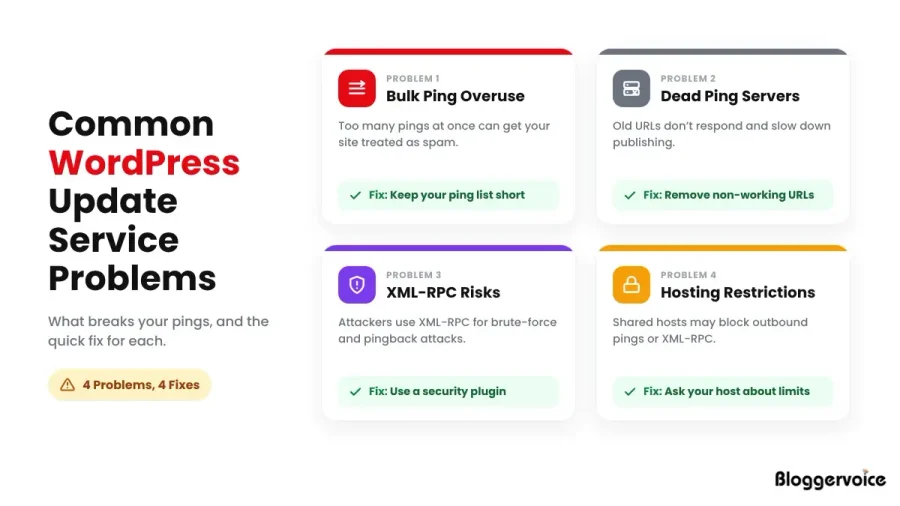
1. Overuse Of Bulk Ping Sites In WordPress Update Services
Overusing bulk ping sites is a common problem with WordPress update services.
When you send too many pings at once, search engines and ping servers may treat your site like spam.
Keep your WordPress ping list short and relevant so your update signals look natural and trustworthy.
2. Dead Ping List Servers In WordPress Update Services
Dead ping list servers often break WordPress update services without showing clear errors.
Many outdated ping URLs no longer respond, which slows down your publishing process.
When WordPress tries to contact inactive servers, it wastes time and server resources.
Review your ping list regularly and remove non-working URLs to keep your update services clean.
3. XML-RPC Security Risks In WordPress Update Services
XML-RPC supports WordPress update services, but it can expose your site to brute-force and pingback attacks.
Many hosting providers restrict XML-RPC because attackers target it frequently.
If your WordPress ping service stops working, your host may have limited XML-RPC access.
Secure it with a firewall or security plugin while allowing only the features you truly need.
4. Hosting Restrictions On WordPress Ping Services
Hosting restrictions can block WordPress update services when your site sends too many outbound requests.
Shared hosting providers often limit external connections to prevent abuse.
If your pings fail repeatedly, check with your hosting support team about rate limits.
Adjust your ping list and publishing habits to stay within hosting rules and avoid blocked notifications.
What Are The Best Practices For WordPress Ping List 2026?
Keep your ping list short and tested, publish once per post, and use Search Console, IndexNow and an updated sitemap for real indexing speed.
1. Ideal Setup For Best Free WordPress Ping SEO
The best free WordPress ping list works when you keep it clean and focused. Remove duplicate entries and avoid outdated servers that no longer respond.
Test each service before adding it to your WordPress update services settings.
A simple, updated ping list improves reliability and supports faster content discovery without overloading your hosting account.
2. Avoiding Mass Ping Spam In WordPress Update Services
Mass ping spam can damage the trust of your WordPress update services so always publish once and ping once instead of sending repeated signals after every small edit.
Search engines track unnatural update patterns, and repeated pings can trigger spam filters.
Plan your content carefully, finalize your post and then publish so your ping activity stays natural and controlled.
3. Keeping Your WordPress Update Services Clean
Keeping your WordPress update services clean should be part of your routine maintenance.
Review your WordPress ping list every six months and remove inactive or broken servers.
Check your XML-RPC settings and confirm with your host that it allows outbound ping requests.
A clean and updated ping list supports smooth publishing and protects your site from unnecessary technical issues.
Make sure your sitemap URL is listed in your robots.txt file, which you can create with our free robots.txt generator.
What Security and Technical Considerations Should You Remember?
WordPress pings run through XML-RPC, which attackers also target, so protect your login, limit how often you ping and keep an eye on your server.
Your WordPress ping list depends on XML-RPC to send update notifications. The same feature can be misused if it isn’t protected, so it’s worth taking a few simple precautions.
1. Brute-Force Login Attempts
Attackers use XML-RPC to try thousands of username and password combinations on your site. If they guess correctly, they get full access to your dashboard.
2. Multiple Password Attempts in One Request
XML-RPC lets attackers bundle hundreds of password guesses into a single request. This makes the attack harder to spot than normal login attempts, and it can get around basic login limits.
3. Server Overload
Repeated XML-RPC requests, whether from attacks or too many pings, use up your server’s resources. On shared hosting, this can slow your site down or even take it offline.
4. Strong Credentials
Use a unique username (never “admin”) and a long, strong password for every account. Strong credentials make brute-force attacks far less likely to succeed.
5. Login Protection Plugin
A security plugin can limit login attempts, add two-factor authentication and block suspicious XML-RPC requests. Many also let you disable the parts of XML-RPC you don’t use while keeping pings working.
6. Firewall Configuration
A website firewall, from your host or a security plugin, blocks known attackers before they reach your site. It’s one of the most effective ways to stop XML-RPC abuse.
7. Limit Ping Frequency
Publish each post once and avoid repeated updates right after publishing. Fewer pings mean less load on your server and a lower chance of being flagged as spam.
8. Monitor Hosting Logs
Check your hosting logs or security plugin reports every few weeks. A sudden spike in requests to xmlrpc.php is a common sign of an attack. A regular SEO audit helps you catch security and technical issues early.
You don’t need to disable XML-RPC to stay safe. A strong password, a security plugin and a firewall protect your site while still letting your WordPress ping list work normally.
Conclusion: Is a WordPress Ping List Still Worth Using in 2026?
Yes, a short WordPress ping list is still worth using, because it’s free and automatic, but it should support your indexing, not replace Search Console and IndexNow.
Keep Ping-O-Matic in your Update Services, remove any old URLs that no longer work, and publish each post once when it’s ready.
Then use Search Console, IndexNow and good internal links to get your new posts indexed quickly.
FAQs About WordPress Ping Lists
Where do I add a ping list in WordPress?
Go to Settings → Writing and paste your ping URLs into the Update Services box, one per line. Then click Save Changes.
Is Ping-O-Matic still working?
Yes. Ping-O-Matic is still the default update service in WordPress, and it forwards your update to several services at once.
Is mass pinging safe?
No. Mass pinging sends repeated requests to many services, most of which no longer work, and it can get your site flagged as spam.
What is better than pinging for fast indexing?
Google Search Console for Google, IndexNow for Bing and other supporting engines, an updated sitemap and strong internal links.
